Java 프로젝트에 Go 코드를 직접 합치는 것은 어렵지만, 두 언어로 작성된 애플리케이션을 함께 사용할 수 있는 방법은 있다.
가장 일반적인 방법은 Java 애플리케이션과 Go 애플리케이션을 각각 독립적으로 실행하고, 서로 RESTful API를 통해 통신하게 하는 것이다.
Java Spring Boot 애플리케이션 설정:
- 기존의 Spring Boot 애플리케이션을 유지
- 필요한 경우, Spring Boot 애플리케이션에서 Go 애플리케이션의 API를 호출할 수 있도록 RestTemplate 또는 WebClient를 설정
Go 애플리케이션 설정:
- 앞서 설명한 대로 Go 애플리케이션을 설정하고 RESTful API를 구현
Java 애플리케이션에서 Go 애플리케이션 호출:
- Java 애플리케이션에서 Go 애플리케이션의 API를 호출하는 코드를 작성
Golang REST API 만들기
https://woony-sik.tistory.com/12
Golang REST API 만들기
오늘은 Golang으로 간단한 REST API를 만드는 방법을 쓸까 한다. 바로 시작하자 우선은 Directory를 하나 만들고 시작 mkdir rest go module 등록 go mod init noah.io/ark/rest main.go 생성 touch main.go Directory 구조 tree .
woony-sik.tistory.com
위 블로그 따라하였습니다
package main

import "net/http" // HTTP 서버와 클라이언트를 구현하기 위해 필요한 패키지

func main() {

	/*
	* 루트 URL ("/")에 대한 요청을 처리하는 핸들러 함수 등록
	* 이 핸들러 함수는 두 개의 매개변수를 받는다
	* rw는 응답 작성기(http.ResponseWriter)이고,
	* r은 요청(*http.Request)
	* 원하는 경로를 함수와 연결시킬 수 있다
	 */
	http.HandleFunc("/", func(rw http.ResponseWriter, r *http.Request) {
		rw.Write([]byte("hello"))
	})

	/*
	* TCP 포트 8080에서 HTTP 서버 시작
	* 두 번째 매개변수는 기본 멀티플렉서를 사용하기 위해 nil로 설정된다
	 */
	http.ListenAndServe(":8080", nil)
}
서버 실행
C:\HYEON_GitHub\10_Go\Project\project_go\ex02>go run ex02.go
2025/01/23 02:27:38 Start server on :8081
package main
import (
"encoding/json"
"log"
"net/http"
)
/*
* 문자열 키와 User 구조체 포인터 값을 가지는 맵을 선언하고 초기화
* 예를 들어, 키는 사용자 ID 또는 이메일 주소가 될 수 있다.
*/
var users = map[string]*User{}
type User struct {
Nickname string `json:"nickname"` // 문자열 타입이며, JSON으로 인코딩될 때 "nickname"이라는 이름으로 변환된다
Email string `json:"email"` // 문자열 타입이며, JSON으로 인코딩될 때 "email"이라는 이름으로 변환된다다
}
func main() {
log.Println("Start server on :8081")
http.HandleFunc("/users", func(wr http.ResponseWriter, r *http.Request) {
switch r.Method { // 요청의 HTTP 메서드에 따라 다른 동작 수행
case http.MethodGet:
json.NewEncoder(wr).Encode(users) // GET 요청인 경우, users 맵을 JSON으로 인코딩하여 응답 본문에 쓴다다
case http.MethodPost: // POST 요청인 경우, 요청 본문에서 JSON 데이터를 디코딩하여 user 변수에 저장
var user User // users 맵에 새로운 사용자를 추가
json.NewDecoder(r.Body).Decode(&user)
users[user.Email] = &user
json.NewEncoder(wr).Encode(user) // 추가된 사용자 정보를 JSON으로 인코딩하여 응답 본문에 쓴다
}
})
http.ListenAndServe(":8081", nil)
}
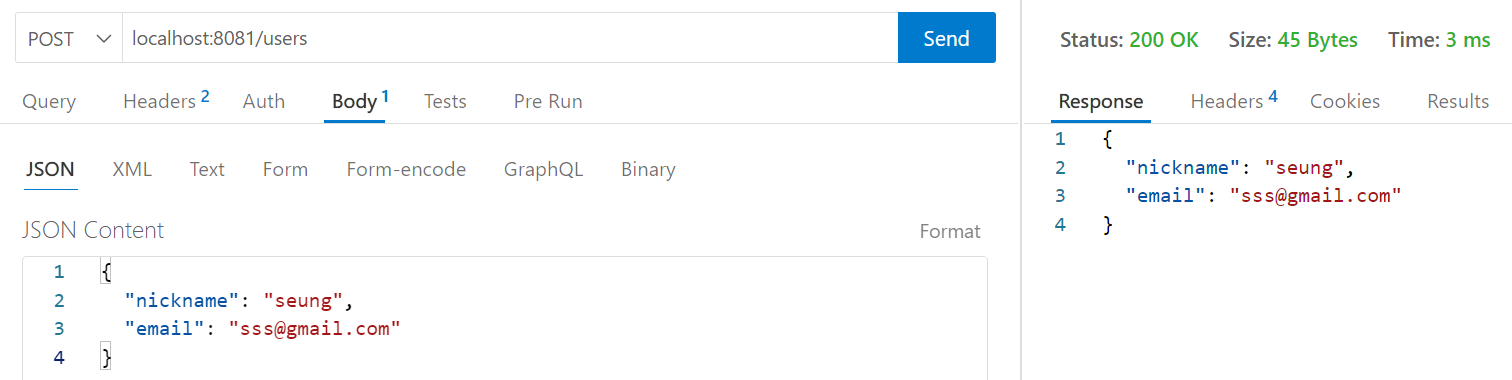

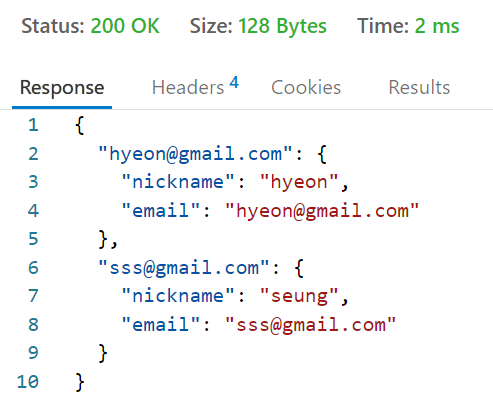
gorilla/mux
- Go 언어에서 널리 사용되는 HTTP 라우터 패키지
- 이 패키지는 URL 경로와 HTTP 메서드에 따라 요청을 처리하는 핸들러를 설정할 수 있게 해준다
- gorilla/mux를 사용하면 RESTful API를 쉽게 구현할 수 있다
gorilla/mux 패키지를 다운로드하고 설치
- 설치가 완료되면 Go 코드에서 gorilla/mux를 임포트하여 사용할 수 있다
go get -u github.com/gorilla/mux


⬇️ Go 파일
package main

import (
	"encoding/json"
	"log"
	"net/http"

	"github.com/gorilla/mux"
)

type User struct {
	Nickname string `json:"nickname"`
	Email    string `json:"email"`
}

// 사용자 데이터를 저장할 맵
var users = map[string]*User{}

// GET 요청을 처리하는 핸들러 함수
func GetUsersHandler(w http.ResponseWriter, r *http.Request) {
	w.Header().Set("Content-type", "application/json")
	json.NewEncoder(w).Encode(users)
}

// POST 요청을 처리하는 핸들러 함수
func CreateUserHandler(w http.ResponseWriter, r *http.Request) {
	w.Header().Set("Content-type", "application/json")
	var user User
	json.NewDecoder(r.Body).Decode(&user)
	users[user.Nickname] = &user
	json.NewEncoder(w).Encode(user)
}

func main() {
	router := mux.NewRouter()

	// GET 및 POST 요청을 처리하는 엔드포인트 설정
	router.HandleFunc("/api/get/users", GetUsersHandler).Methods("GET")
	router.HandleFunc("/api/post/users", CreateUserHandler).Methods("POST")

	log.Println("Starting server on :8081")
	http.ListenAndServe(":8081", router)
}
자바 스프링부트 포트번호와 겹치지않게 변경해주었다.
⬇️ Java SpringBoot
package com.sign.sign.controllers;

import org.springframework.web.bind.annotation.RestController;
import org.springframework.web.client.RestTemplate;
import org.springframework.http.HttpHeaders;
import org.springframework.http.HttpStatus;
import org.springframework.http.ResponseEntity;
import org.springframework.web.bind.annotation.GetMapping;
import org.springframework.web.bind.annotation.ResponseBody;


@RestController
public class TestRestController {

    @GetMapping("/test")
    @ResponseBody
    public String test() {
        RestTemplate restTemplate = new RestTemplate();
        String goApiUrl = "http://localhost:8081/api/get/users";
        String response = restTemplate.getForObject(goApiUrl, String.class);
        return response;
    }

    @GetMapping("/test2")
    public ResponseEntity<String> test2() {
        RestTemplate restTemplate = new RestTemplate();
        String goApiUrl = "http://localhost:8081/api/get/users";
        String response = restTemplate.getForObject(goApiUrl, String.class);

        HttpHeaders headers = new HttpHeaders();
        headers.add(HttpHeaders.CONTENT_TYPE, "application/json");

        return new ResponseEntity<>(response, headers, HttpStatus.OK);
    }

}
1. Go 서버 가동
2. Spring 서버 가동
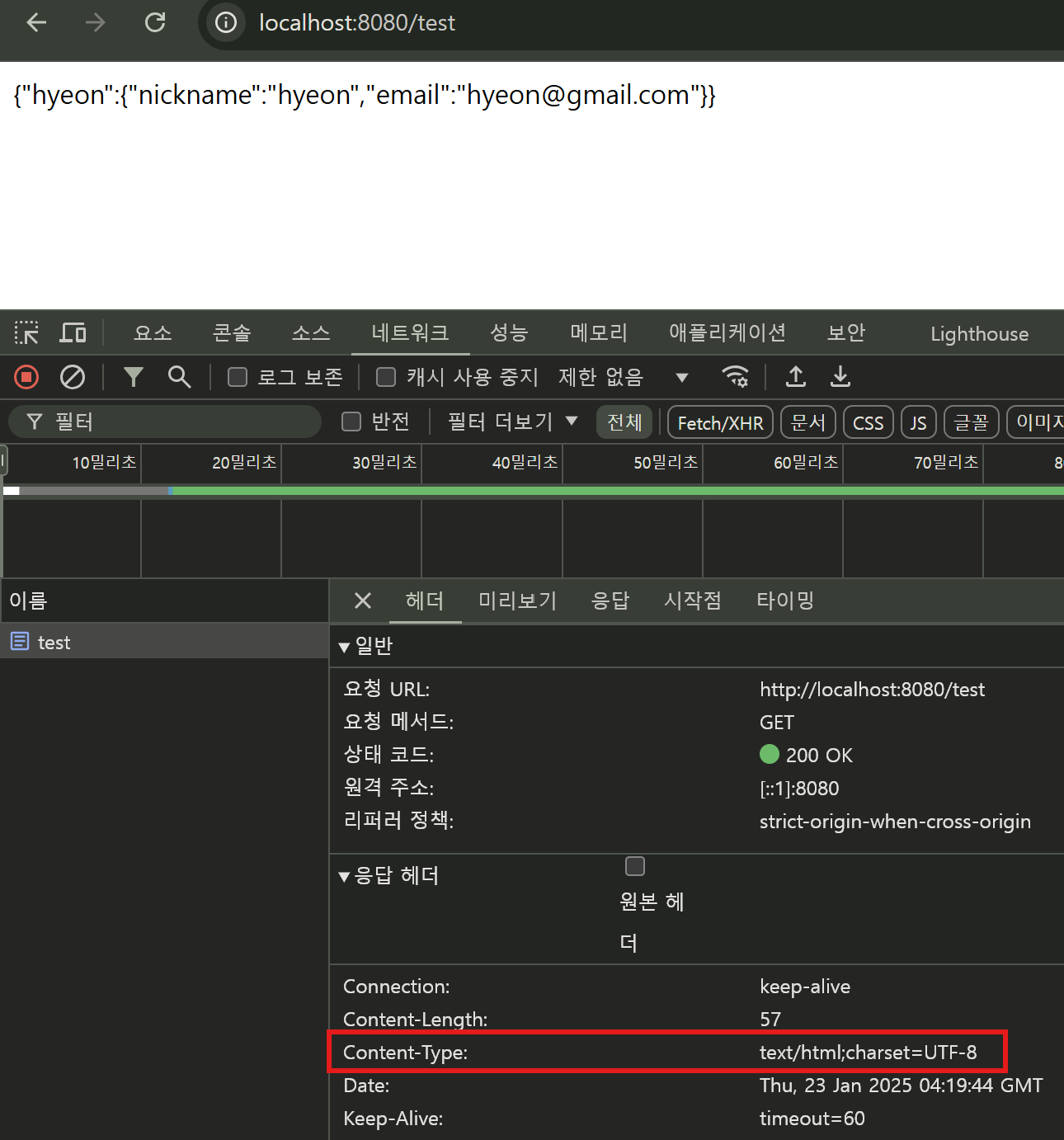
첫번째 경우 text로 나와
SpringBoot에서 JSON 응답 반환하게 변경해보았다

WebClient 를 사용한 Go 서버의 REST API 호출
RestTemplate 보다 WebClient 방식이 더 낫다 생각하여 클라이언트 변경
2025.01.23 - [IT/Spring] - RestTemplate WebClient RestClient
RestTemplate WebClient RestClient
Spring Framework에서 HTTP 요청을 처리하기 위해 사용할 수 있는 주요 클라이언트는 RestTemplate, WebClient, 그리고 RestClient 이다.1. RestTemplate- 동기식 HTTP 클라이언트: 요청을 보내고 응답을 받을
iamsh.tistory.com
package com.sign.sign.controllers;

import org.springframework.http.HttpHeaders;
import org.springframework.http.HttpStatus;
import org.springframework.http.ResponseEntity;
import org.springframework.web.bind.annotation.GetMapping;
import org.springframework.web.bind.annotation.RestController;
import org.springframework.web.reactive.function.client.WebClient;

import reactor.core.publisher.Mono;

@RestController
public class TestRestController2 {

    /**
     * WebClient.Builder를 사용하여 WebClient 인스턴스 생성
     * WebClient는 HTTP 요청을 보내고 응답을 받는 데 사용되는 클라이언트
     * 기본 URL을 http://localhost:8081로 설정한다.
     */

    private final WebClient webClient;

    // 생성자에서 WebClient.Builder를 사용하여 WebClient 인스턴스 생성
    public TestRestController2(WebClient.Builder webClientBuilder) {
        // build 메서드를 호출하여 WebClient 인스턴스를 생성
        this.webClient = webClientBuilder.baseUrl("http://localhost:8081").build();
        // 이 기본 URL은 Go 서버의 주소
        // 클래스의 멤버 변수인 webClient에 생성된 WebClient 인스턴스 할당
    }

    @GetMapping("/test3")
        public Mono<ResponseEntity<String>> test3() {
            return this.webClient.get()     // WebClient 사용한 GET 요청
                        .uri("/api/get/users")      // 요청할 엔드포인트 설정
                        .retrieve()     // 요청을 실행하고 응답 받는다
                        .bodyToMono(String.class)   // Mono<String>으로 변환 후
                        .map( response -> {
                            HttpHeaders headers = new HttpHeaders();
                            headers.add(HttpHeaders.CONTENT_TYPE, "application/json");
                            return new ResponseEntity<>(response, headers, HttpStatus.OK);
                            // ResponseEntity로 랩핑하여 반환
                        } );
        }
}'IT > Go' 카테고리의 다른 글
| 메서드 리시버 (0) | 2025.01.29 |
|---|---|
| Golang Live Reloading command line utility (0) | 2025.01.23 |
| Go 변수, 데이터타입 (0) | 2024.12.26 |
| Go 언어 개발 환경 구성 (1) | 2024.12.26 |
| Go언어란 (0) | 2024.12.26 |